
How to Calculate Your Website Conversion Rate: 3 Steps to Find Traffic-to-Inquiry Bottlenecks
You open your dashboard to thousands of visits but single-digit inquiries, and your first reaction is a lack of traffic. Don't rush to boost Google Ads. B2B website conversions are about leaving inquiries, not checkouts. Conversion rate equals inquiries divided by visits. Follow these 3 steps to audit your site.
You open your website dashboard and see 1,200 visits this month, but only 3 inquiries.
Your immediate reaction is: not enough traffic. Should we boost Google Ads or add a few more product pages?
I've handled many similar consultations. The real and common bottleneck isn't low traffic—it's that the conversion rate is stuck at a very low level. Blindly increasing the budget is like opening the leaks in your funnel wider.
In B2B independent websites, a conversion isn't an order; it's leaving an inquiry. The conversion rate is simply the number of inquiries divided by the visit count.
Let's run the numbers from just now: 1,200 visits, 3 inquiries. The conversion rate is 0.25%.
Before jumping to conclusions about whether this number is bad, follow these 3 steps.
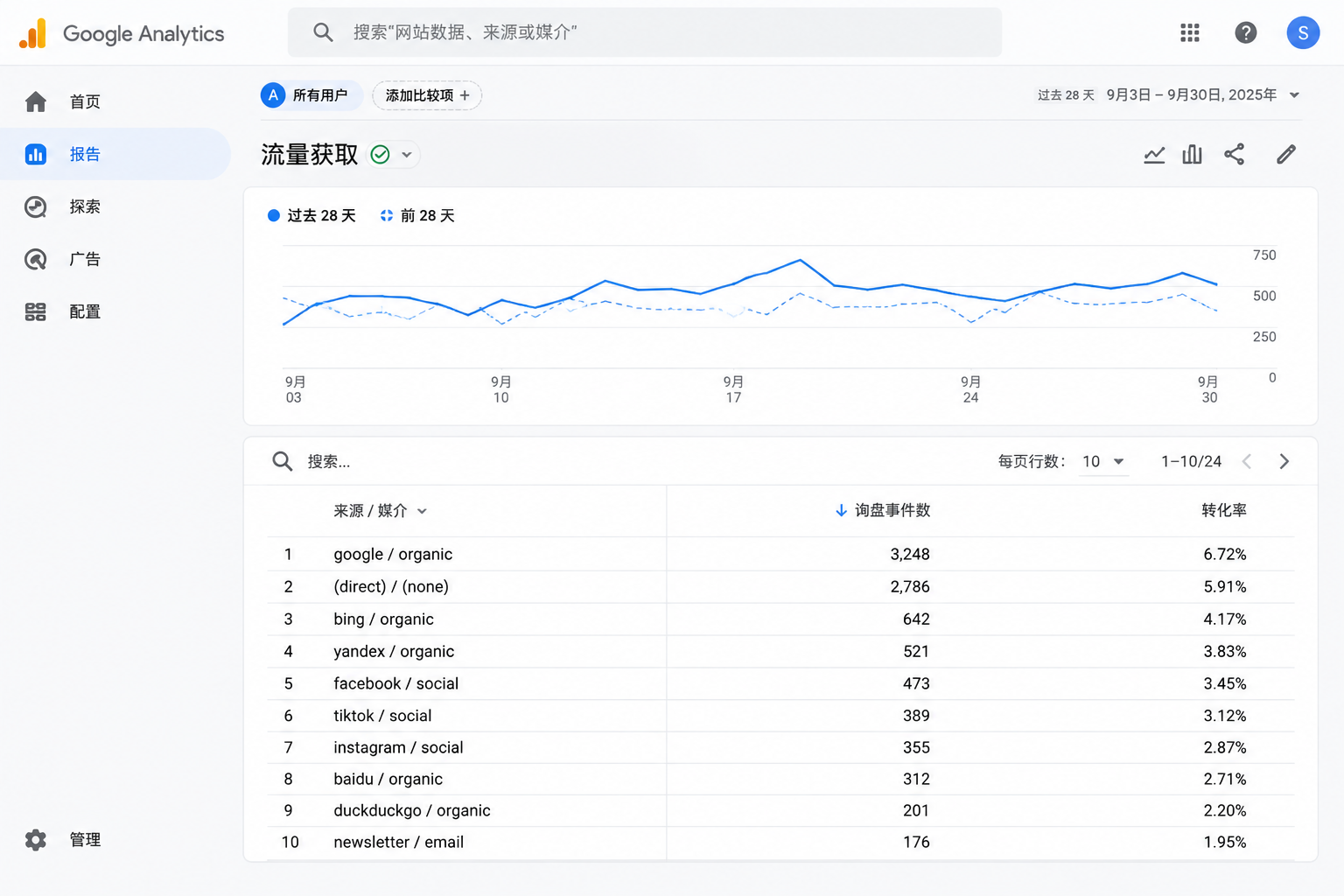
Step 1: Check Traffic Sources First, Don't Blame the Page for Everything
Some dashboard visit numbers look good, but break down the sources and the truth comes out.
- If traffic from Google Ads is high but inquiries are low, first check if the keywords and landing page match. The ad copy promises Model A equipment, but the page's above-the-fold section talks about company history and factory size, causing visitors to close it within seconds.
- If organic search traffic is high but inquiries are low, first check if the incoming keywords show purchasing intent. Students researching industry materials, competitors, or individuals looking at tutorials won't send inquiries.
- If social media traffic is high but inquiries are low, first strengthen the page's trust signals. People clicking in from a post have zero expectations; without seeing a factory, certifications, or case studies, they won't casually leave contact info.
Until you break down the traffic sources, don't change pages or spend money. Pull the source data first so you know what actually needs fixing.
Step 2: Look at Landing Pages, Not the Homepage
The first page traffic lands on is the main battlefield for conversion rates.
No matter how pretty the homepage is, if visitors enter from a product page and the first screen looks wrong, they will still leave.
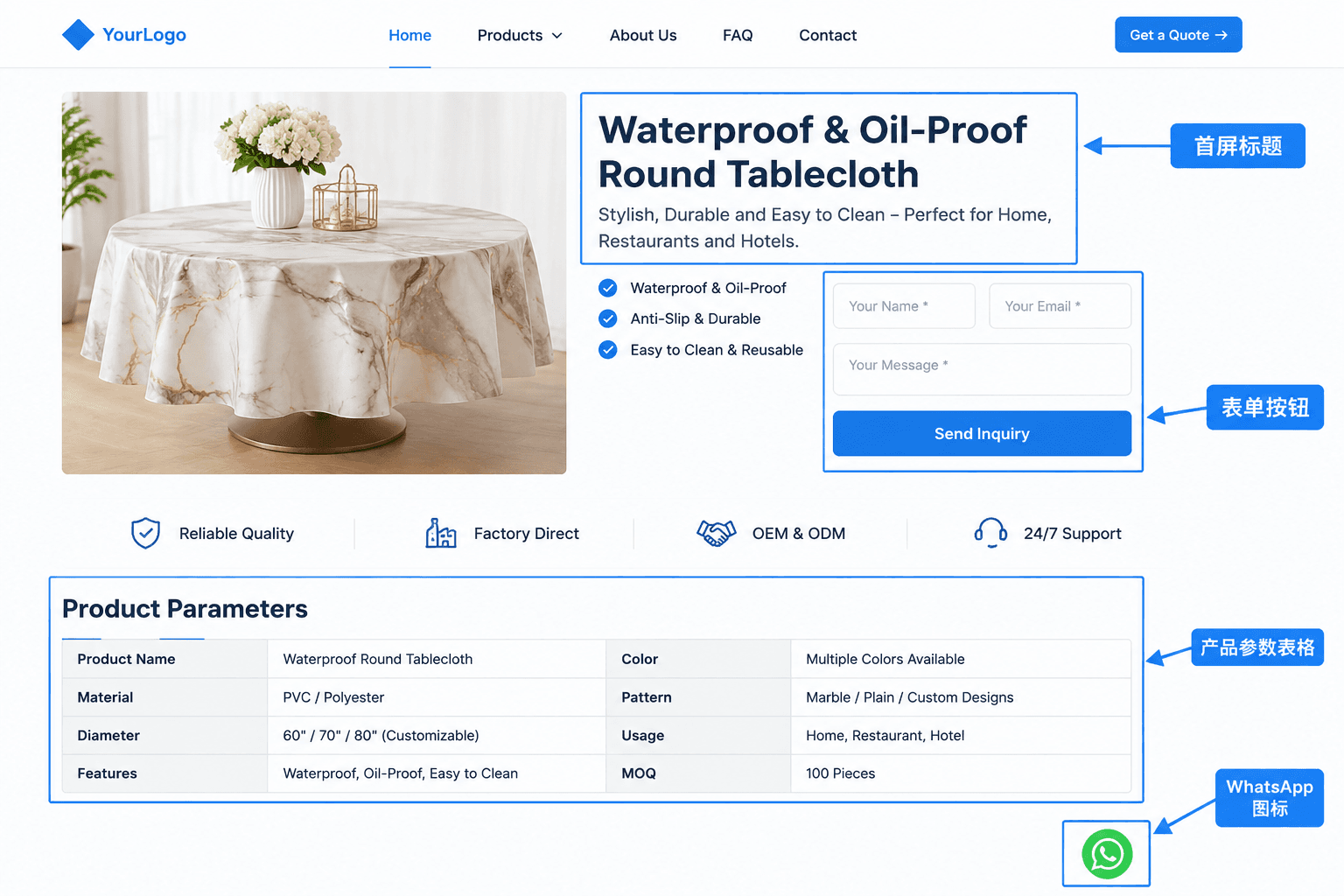
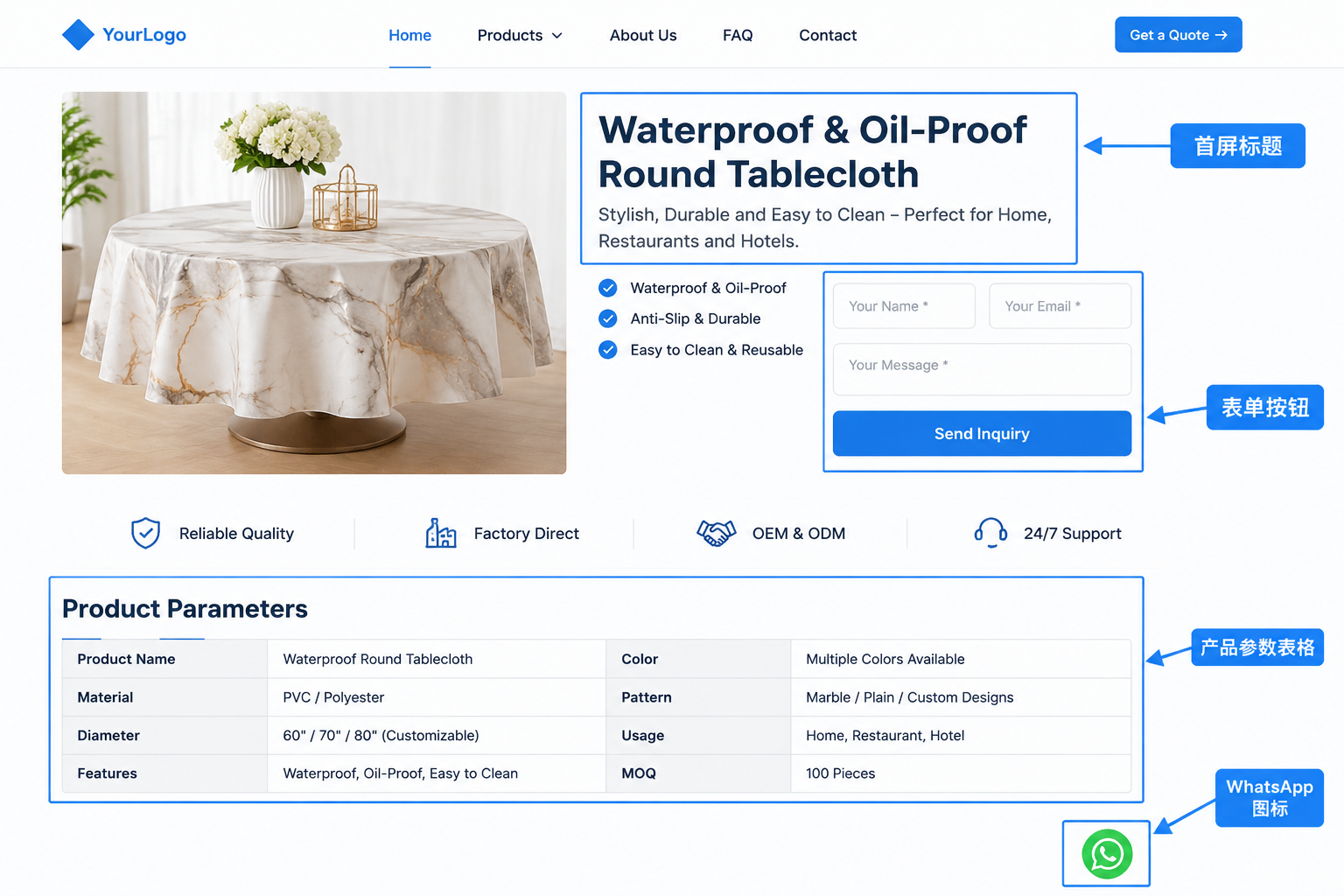
When we do projects, we usually have clients self-audit against 4 criteria:
- Can the above-the-fold area clearly explain what you sell and who you sell it to within 3 seconds?
- Is the form visible above the fold, or do visitors have to scroll two screens down to find it?
- Are there at least two contact methods provided, such as email, WhatsApp, or phone?
- Are product parameters, minimum order quantities (MOQ), and delivery times written directly on the page instead of making visitors guess?
If two of these four criteria fail, the conversion rate usually won't look pretty. This evaluation sequence aligns with what is discussed in B2B Independent Website Has No Inquiries? It's Usually the "Mismatch" Problem: A 4-Point Self-Audit Checklist.
Step 3: Check the Inquiry Path to Find Breakpoints
Some people start filling out the form but don't finish submitting it. Others can see the button but can't click it.
If these breakpoints aren't tracked, you'll never find them.
Do a real-user test: click through once on your phone and once on your computer, entering from both a product page and a landing page, and walk through every single path completely.
If the breakpoint is stuck at the form, it's usually because there are too many fields. For B2B inquiries, don't ask for company name, tax ID, or exact budget right away; get the name and email first, and collect the rest of the information during follow-up.
If There Are No Major Issues on the Page, Check the Search Engine Results Page (SERP)
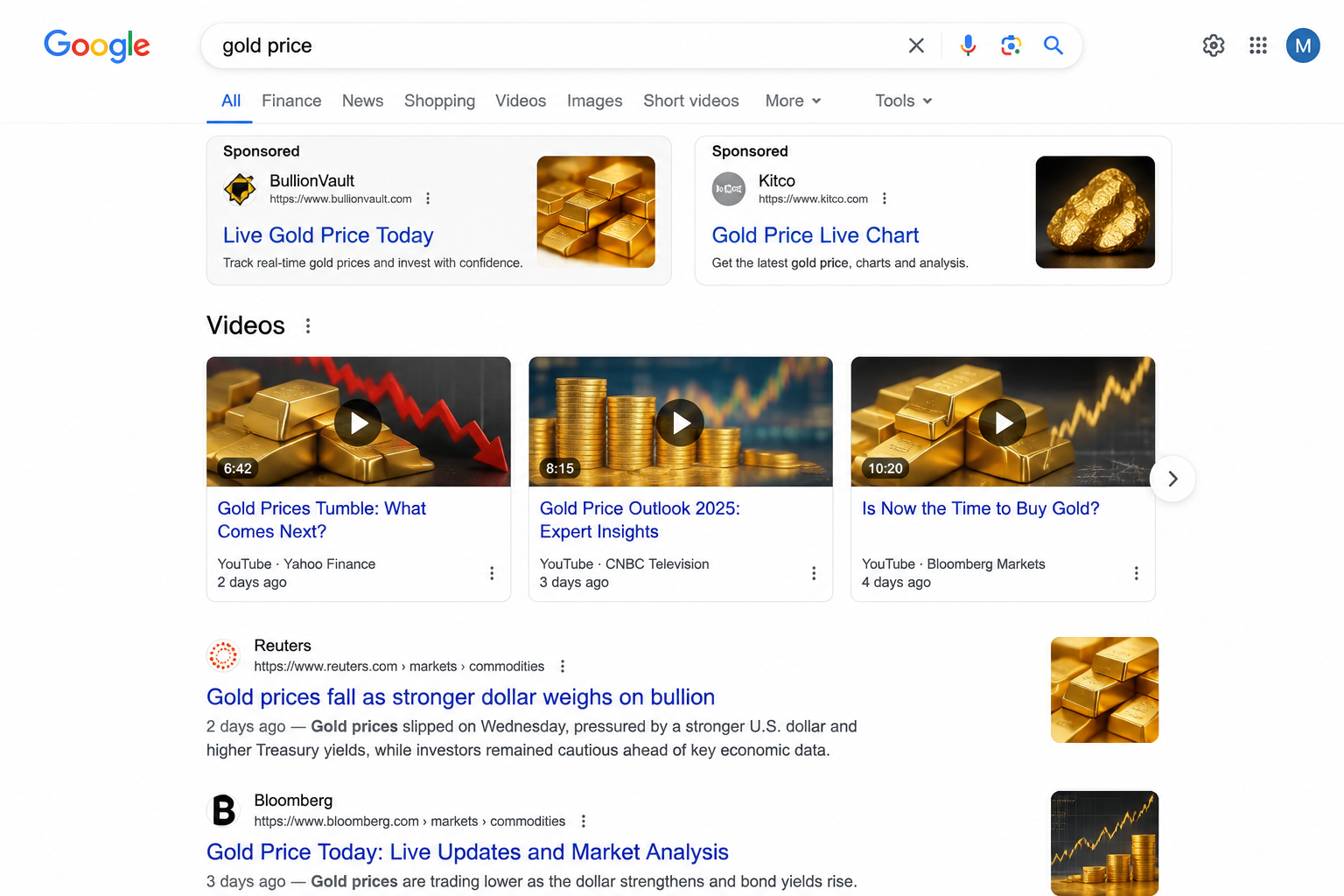
A client selling mechanical parts came for a consultation, saying that when searching for their product keywords, they found that platforms and videos dominated the top rankings, and their official website's organic position couldn't even make it to the first page.
I told them not to check rankings yet, but to look at the structure of the search results page.
Count how many spots ads take, how many videos take, and how many local packs and FAQs take. Once you count those, see how many organic results are actually left.
The ranking systems described in Google's official documentation present ads, videos, local results, and organic results separately, squeezing organic rankings severely.
If the top four results on the search results page are entirely YouTube videos and Alibaba International, it's very difficult for your own official website to capture intent-driven clicks in organic positions. At that point, tweaking page titles is useless; you need to adjust your keyword strategy or align with Google SEO content planning.
You can use tools like Ahrefs or Semrush to examine competitor page titles, content depth, and how H-tags are structured.
There is only one rule: you can copy structure and angles, but never copy content and data.
For example, if competitors turn FAQs into a separate section and place MOQs and certifications above the fold, you can learn from that structure. But don't copy their exact product parameters and copywriting—that invites the risk of duplicate content.
Where to Find Authoritative Resources
If you want to monitor conversion rates yourself, Google Analytics (GA4) official documentation is the first tool you should consult.
Set up event conversions properly to see the conversion rate for each source, each page, and each device type. A single global number doesn't tell the whole story.
Search Console's official Help Center shows which keywords drive clicks and which only get impressions, helping you assess incoming traffic quality.
For e-commerce stores, Merchant Center's official guidelines have requirements for product data and page consistency, which directly impact visitor trust at the final moment before purchasing.
For a site launched just a few months ago, don't just look at the global conversion rate. Break down sources by month and data by device before deciding what to change.
If you're unsure where your site is stuck, you can send me your inquiry path and landing page for a requirements assessment. I'll provide a detailed breakdown within 1 working day, showing whether you should fix your pages first or adjust your traffic structure. For pricing, check the B2B Website Development Services List.