
How to Design a Multilingual Website: Differences Between Translation Plugins and Independent Language Versions
Building a foreign trade website with multiple languages is not as simple as installing a translation plugin. The two approaches differ in whether pages have independent URLs: translation plugins make search engines see only one language, while independent language versions paired with hreflang allow every language to be indexed. This article gives you a multilingual website design checklist and specific steps—from URL structure, hreflang deployment, content localization to image optimization—ex
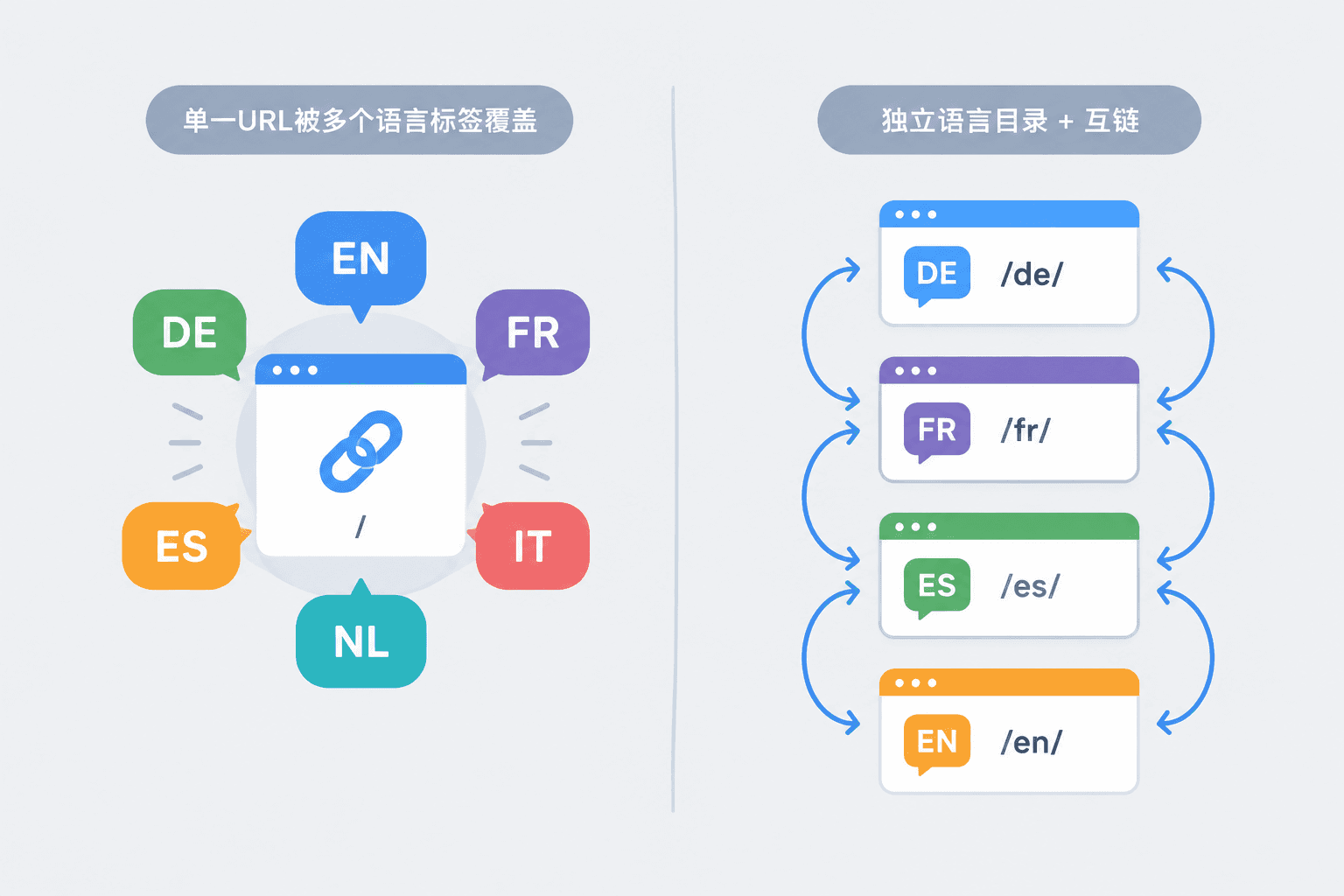
When search engines crawl multilingual websites, they treat each language version as a separate page by default. If you don't send signals, they might judge it as duplicate content, index only one version, or push the German page to English users. When designing a multilingual website, the first step isn't installing a plugin; it's deciding what structure these language versions should use.
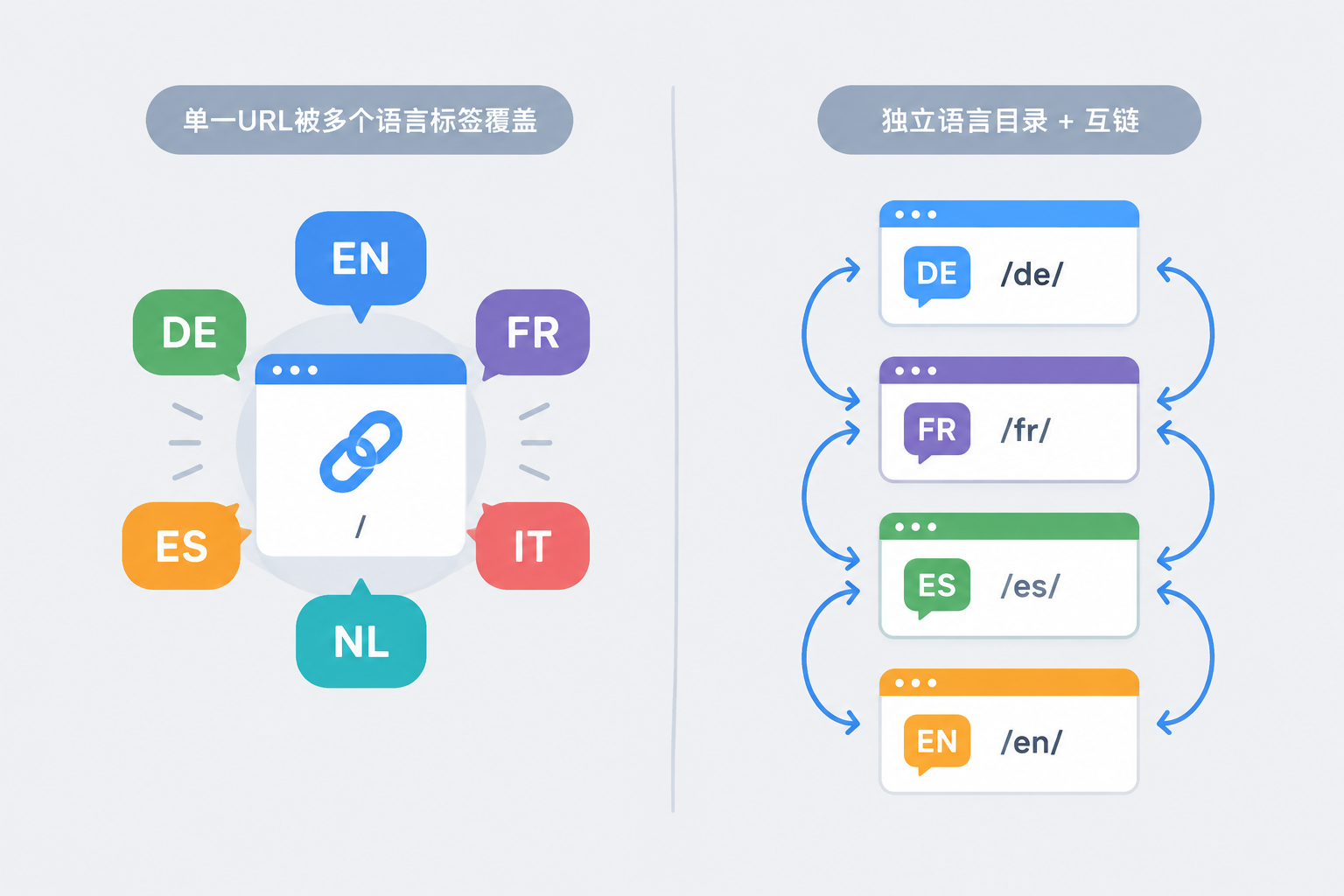
We often see two approaches in our projects, which look similar on the surface but differ greatly in results. One is a translation plugin, where page URLs remain unchanged and text is dynamically replaced when switching languages in the browser; the other is independent language versions, such as /de/ or de.example.com, where each language has its own set of pages. Many business owners think that installing a plugin equals building a multilingual website, and this misconception will render subsequent SEO efforts useless.
The Two Most Confusing Approaches in Multilingual Website Design
The fundamental difference between translation plugins and independent language versions is whether pages have independent URLs and content ownership.
Under the translation plugin solution, all languages share the same URL, and switching languages only changes the text on the page while the HTML returned by the server is often still in the main language. Google may only see the English version, while German and Spanish content never enter the index. Unless you do a lot of extra technical processing, this type of multilingual setup does not help with search.
Independent language versions are different. Each language has an independent URL, paired with hreflang cross-linking, so search engines can clearly know these pages are translated versions of the same content, which URL corresponds to which language, and which is the default fallback. For Google SEO of foreign trade websites, independent language versions are a safer approach; translation plugins are better suited for logged-in users to temporarily view content, not as a primary multilingual SEO architecture. Regarding hreflang, we also discussed it in Foreign Trade SEO & Promotion. It belongs to basic setup, not something to be patched up after launch. This also involves common misjudgments about multilingual.
Checklist of Criteria to Verify Before Multilingual Website Design
Whether a multilingual website design is qualified can be verified item by item using the following five items. Missing even one will affect indexing and conversion.
- Is the URL structure clear: Do you use subdirectories (/de/) or subdomains (de.example.com) instead of parameters (?lang=de)? Parameter-style multilingual setups are unfriendly to search engines and difficult to mark up with hreflang.
- Is hreflang deployed: Do language pairs point to each other and include the x-default fallback? If this is missed, search engines might treat French pages as duplicate content.
- Is content localized: Not just translating text, but whether currency, size units, contact info, and shipping policies switch accordingly. Multilingual sites that only translate text usually have lower-quality inquiries.
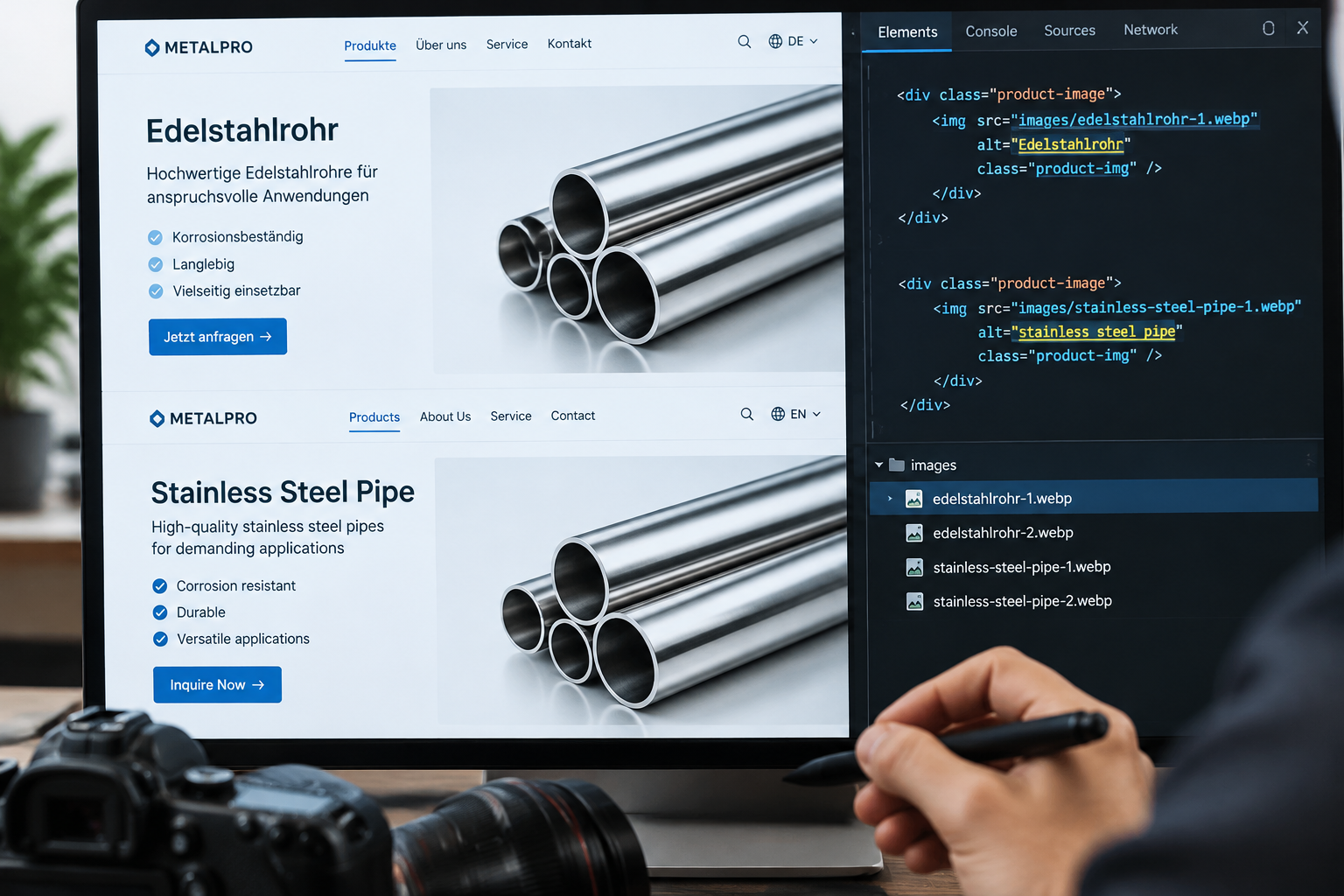
- Are images localized and optimized: File names and alt text should carry semantics, avoiding 1.jpg or unamed files; format priority should be WebP, with lazy loading for non-above-the-fold images. Image alt texts for multilingual versions should also be written in the corresponding language, as image search is a long-tail traffic source for foreign trade sites.
- Is the language switcher entry visible: Can users find the language switcher at a glance on the homepage instead of hiding it deep in the footer or menu? The visibility of the switcher directly affects the visit depth of minor language pages.

Specific Steps for Multilingual Website Design
Multilingual website design can be done in the following order, with clear acceptance points for each step.
- Determine the language scope: Based on inquiry distribution and target markets, choose 2-3 core languages first rather than spreading out to ten languages right away. The more languages, the higher the maintenance cost and the poorer the depth of content localization.
- Design the URL structure: Uniformly use subdirectories or subdomains, avoiding parameters; plan the main language and backup languages well, with all language versions of the same page sharing a set of layouts.
- Prepare localized content: Translation should be done by humans or professional translators. Product parameters and industry keywords must be localized; do not launch machine translations directly.
- Configure hreflang and x-default: Add cross-linking tags to every page, or submit via sitemap. This is best done right once during the website building stage, as later modifications are costly.
- Optimize multilingual images: Set different alt texts and file names for each language version, compress to WebP, do not lazy-load above-the-fold images, but lazy-load non-above-the-fold ones. Product images and scene images should be matched proportionally—don't make the whole page white-background images, and watch out for image theft and copyright risks.
- Post-launch verification: Use Google Search Console to check the indexing and errors of language versions, and fix hreflang errors. This step can discover structural issues and prevent minor language pages from dropping out of the index.
A multilingual website doesn't end at launch. If you design the structure correctly early on, the saved remodeling costs and ranking adjustment time for each subsequently added language will far exceed the extra time spent the first time. The configuration work saved now will be paid back doubly in subsequent content updates and ranking adjustments for every language.